

10,000+ dermatology SKUs
A catalogue this size has to stay browsable by category, concern and ingredient without slowing the store down.
Case study · Shopify Plus · Health
Clinikally is India's #1 teledermatology platform. Patients book doctor-led consultations and fill prescriptions alongside a catalogue of more than 10,000 dermatology SKUs, some of which can only be sold against a valid prescription.
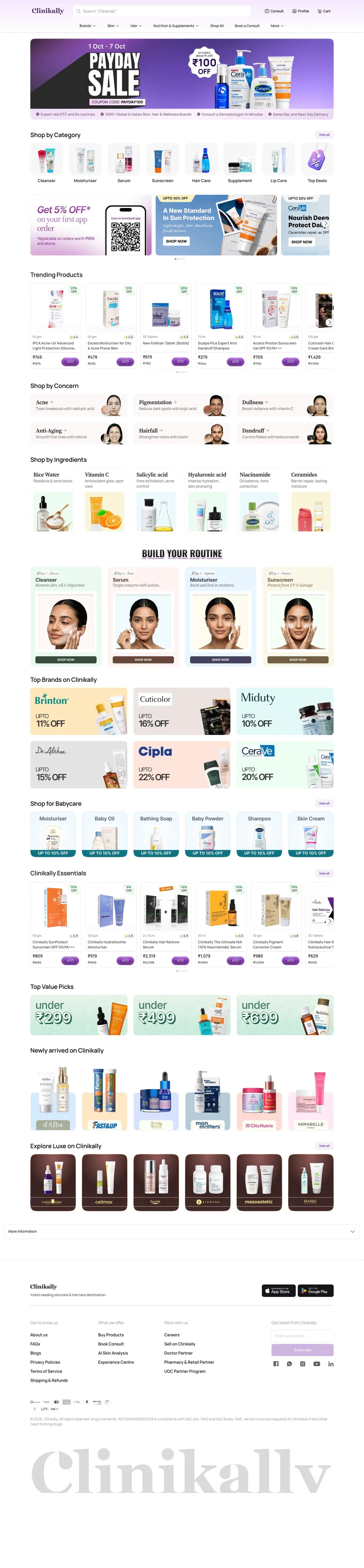
Live storefront · scrolling top to bottom
01 / PROJECT DETAILS
Clinikally serves customers across India and the wider APAC region.
clinikally.com (opens in a new tab)What we delivered
02 / THE PROBLEM
Clinikally needed a commerce platform that could handle 10,000+ dermatology SKUs, integrate with a doctor-consultation flow, manage prescription cart logic, and scale across India's wide consumer base. The existing system couldn't handle the complexity, and conversion was bleeding at every step from consultation to purchase.
A catalogue this size has to stay browsable by category, concern and ingredient without slowing the store down.
Some SKUs are category-gated: they can only be sold against a valid prescription, and the old system could not enforce that.
Doctor-led consultations and the shop were separate journeys, so patients dropped off between advice and purchase.
Each hand-off in the consultation-to-purchase flow lost orders that had already been earned.
03 / THE SOLUTION
We architected a custom Shopify Plus build with metafield-driven category gating, a custom checkout extension for prescription verification, and an account model for returning patients with stored prescriptions.
Which products need a prescription is stored as data on the product, not hard-coded in the theme, so the catalogue team controls it.
A custom checkout extension checks for a valid prescription before a gated product can be bought.
Returning patients get a B2B-like account that keeps their prescriptions on file, so a repeat order takes one visit.
India-market commerce configuration: cash on delivery, UPI and wallet payments.
Desktop and mobile · the same build
04 / STRATEGY
Four decisions shaped the build.
01
We ran a 6-week discovery to map the entire patient journey, from consultation to refill, before writing any code.
02
Gating lives in metafields. A rule changes when the catalogue changes, without a developer or a theme release.
03
Prescription checks happen inside checkout, where the order is actually placed, instead of being scattered across the theme.
04
Dermatology is repeat care. The account model is built around the second and third order, not only the first.
05 / SCREENS
The whole homepage on desktop and on a phone, scrolling top to bottom side by side. Hover to hold it still.

06 / RESULTS
10K+
SKUs live
dermatology products in one catalogue
+41%
Checkout conversion
after the checkout rebuild
2.3×
Repeat orders
from patients with stored prescriptions
<2s
Mobile load
the catalogue is tuned for sub-2s mobile loads
07 / PROCESS
The same four stages as every engagement, with the specific work done for Clinikally at each one. The steps play through in order.
Stage 1
We review the current theme, apps and analytics, then write a fixed-scope SOW with named deliverables and a date.
What we did for Clinikally
Stage 2
Work happens in a dev store on a Git-backed workflow. You get a preview link from week one, not a reveal at the end.
What we did for Clinikally
Stage 3
Cross-browser and device QA, redirect map, analytics verification, then a launch window agreed with you rather than dropped on you.
What we did for Clinikally
Stage 4
Fourteen to sixty days of included post-launch support while real traffic finds the edge cases.
What we did for Clinikally
08 / THE STOREFRONT
The full Clinikally homepage as shoppers see it. Scroll inside the frame to move through it from the offer strip to the footer.
09 / MORE WORK
 Shopify Plus · DTC
Goom: Multi-region Plus build with Hebrew/English RTL
Mobile CR+58%Regions3PageSpeed95+
Read the case study
Shopify Plus · DTC
Goom: Multi-region Plus build with Hebrew/English RTL
Mobile CR+58%Regions3PageSpeed95+
Read the case study
 Shopify Plus · F&B
Dana's Bakery: ZIP-gated perishables & drop architecture
Conversion2.1×AOV YoY+34%
Read the case study
Shopify Plus · F&B
Dana's Bakery: ZIP-gated perishables & drop architecture
Conversion2.1×AOV YoY+34%
Read the case study
 Shopify · Apparel
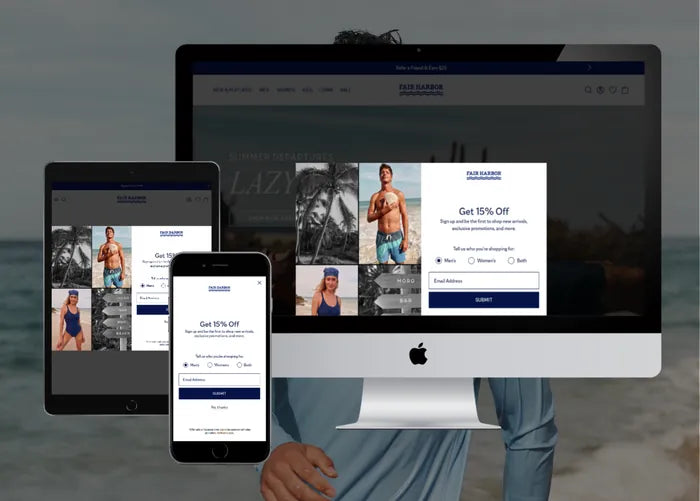
Fair Harbor: Coastal redesign & Shop Pay-tuned checkout
RPV uplift+27%Mobile share72%UX rating4.9/5
Read the case study
Shopify · Apparel
Fair Harbor: Coastal redesign & Shop Pay-tuned checkout
RPV uplift+27%Mobile share72%UX rating4.9/5
Read the case study